
Case: Email-native reporting for VFX leadership
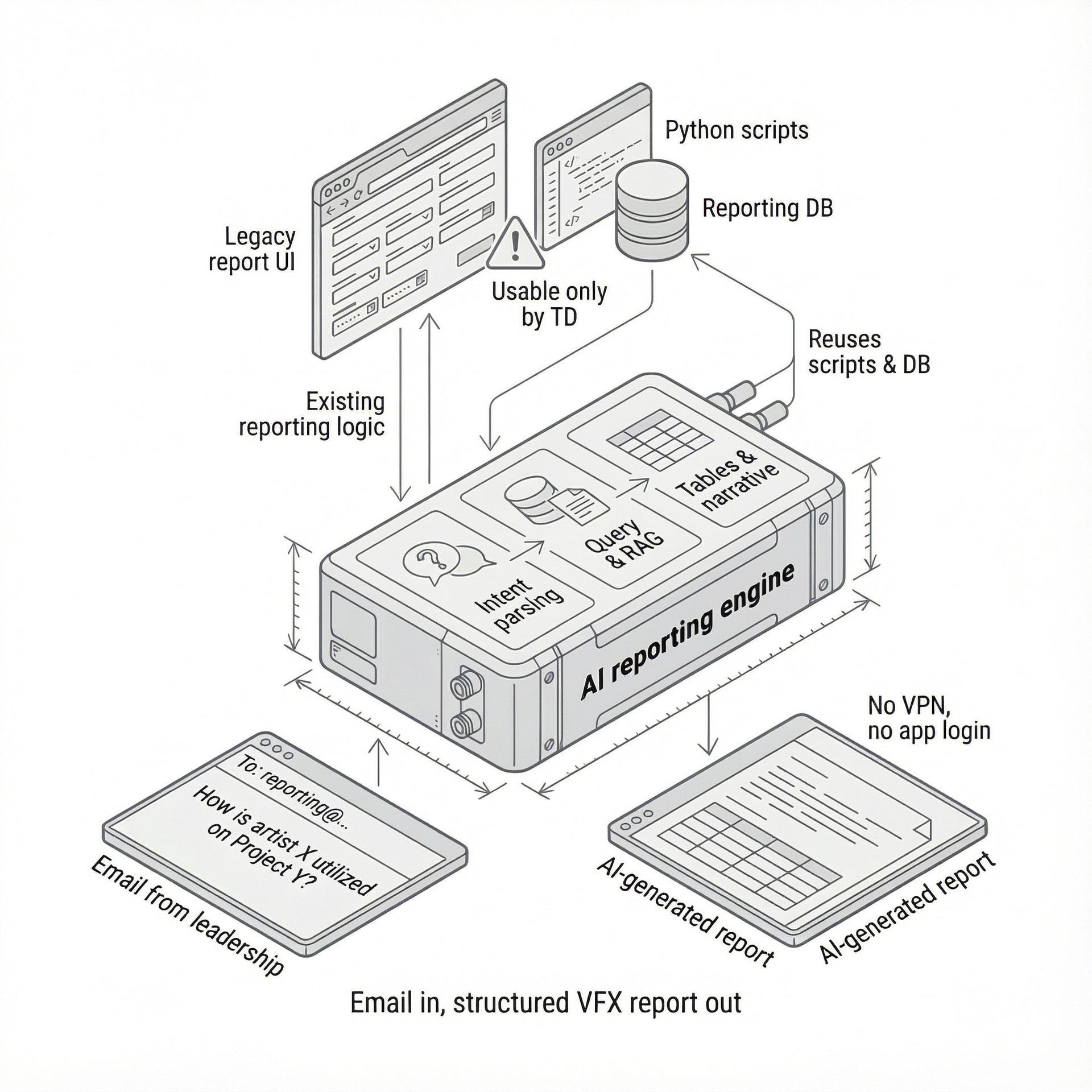
A global VFX and animation studio relied on a fragile internal reporting tool for mission-critical production and resourcing decisions. We turned leadership's natural email workflows into a robust, AI-powered reporting interface.
- Step 01
Context & starting point
- Global VFX / animation studio with multiple large, concurrent productions and several management layers across many studios.
- A central reporting system aggregated production data (shots, artists, tasks, time, etc.) to support daily and strategic decisions.
- All major operational and resourcing decisions depended on these reports being accurate and timely.
- Step 02
The internal tool (as we found it)
- Backend built from ad‑hoc Python scripts orchestrated by a centralized web application running on the internal network.
- UI was a parameter‑heavy web form that generated SQL‑like queries for production, project, and artist data.
- No robust input validation: incorrect date formats, project/artist identifiers, or ranges would generate invalid queries or runaway jobs.
- A single bad query could freeze report generation for everyone or crash the report service, often requiring manual restarts.
- Most managers bypassed the UI and asked the technical director (TD) to run reports manually, creating a severe bottleneck and key person risk.
- Multiple internal rewrite attempts by pipeline/dev tools engineers improved code quality but not UX; the tool remained “usable only by the TD.”
- Step 03
Why change / trigger
- The TD and senior developers were spending a disproportionate amount of time generating reports and firefighting issues instead of higher‑value technical work.
- Leadership had lost confidence in further investing in the existing web app due to sunk costs, yet the tool remained mission‑critical.
- On‑prem access (local network / VPN only) meant many executives simply did not use the web app, compounding under‑utilization.
- The organization needed a reporting interface that matched leadership workflows without another large rebuild of the legacy UI.
- Step 04
What we did
- Assessed the existing system end‑to‑end: Python scripts, database structure, report types, and the current web UI’s parameter model.
- Shadowed different user groups (TDs, production managers, non‑technical executives) to map how questions about project status were actually asked and answered.
- Concluded that any UI reproducing the full parameter set (even with cascading / tree‑like filters) would remain complex and error‑prone for non‑technical users.
- Identified that the most natural UX already in use by leadership was plain‑language requests (“Can I see artist X’s utilization for Project Y?”) sent via email or verbal asks to the TD.
- Designed a new interaction model where leadership sends plain‑language questions to a dedicated email inbox instead of logging into the internal web app or using VPN.
- Implemented an AI‑driven middleware service that:
- Monitors the inbox and extracts the user’s intent and requested data fields.
- Constructs and executes the appropriate database queries against the existing reporting DB.
- Serializes and prunes raw result sets into a clean, compact representation to avoid confusing the language model.
- Builds a lightweight RAG (Retrieval‑Augmented Generation) context from the serialized data.
- Generates structured tables and a concise narrative summary of the results.
- Drafts and sends a reply email with both tabular data and a human‑readable explanation.
- Handles follow‑up questions (for example “What about in Q4?”) by reusing prior context and adjusting the underlying query.
- Step 05
The new product
- A standardized “reporting via email” AI service that turns natural language questions from leadership into structured production reports.
- Primary users: executive leadership, production managers, and department heads across all studios, who previously depended on the TD to run queries.
- Main capabilities:
- Free‑form question input via standard corporate email (no VPN or app login required).
- Automatic query generation and execution on the existing production data store.
- RAG‑based summarization that returns both a data table and an executive‑level narrative.
- Support for conversational follow‑ups that refine time ranges, projects, or artists.
- Rolled out as a single internal product used company‑wide across the client’s global studio network.
- Step 06
Results & impact
- Near‑instant adoption across leadership in multiple studios; no UX training required as everyone already used email.
- TD and key developers reclaimed significant time previously spent on manual report generation and service restarts.
- Reporting access decoupled from VPN / local network friction, increasing frequency and breadth of data‑driven questions.
- Reduced operational risk by removing the TD as the single gateway to critical reporting, while keeping the existing reporting backend intact.
- Improved quality and consistency of reports, as AI‑generated queries and validation logic replaced brittle manual parameter entry.
- Step 07
Tech highlights
- Reused existing Python‑based reporting scripts and database schema as the core data source.
- Added an email ingestion service (mailbox listener) that triggers the AI orchestration workflow.
- Implemented a RAG pipeline: structured query → result serialization → context‑building → LLM summarization and table generation.
- Integrated a modern LLM (vendor‑agnostic here) for intent parsing, query drafting, follow‑up handling, and narrative generation.
- Kept deployment within the studio’s existing infrastructure and security model, while exposing access through standard corporate email.
- Step 08
Where we left them
- The product is now owned as a standard internal reporting service by the central pipeline/IT tools team, who maintain the AI service and extend supported question types as new reporting needs emerge.
- It is in active use across all studios by leadership and production, with a roadmap to deepen coverage of additional production metrics and scenarios.
Email-native reporting for VFX leadership
New UI screens shipped. Instead, we reused the existing reporting backend and wrapped it in an AI-powered, email-native interface that leadership adopted immediately.
We use a tight stack that balances speed, robustness, and long‑term maintainability.











Everything You Need to Know
Do we need a fully working tool before we talk?
No. It is enough to have a real internal asset: a heavy spreadsheet, prototype app, script bundle, or R&D tool that people rely on.
What if we only want an internal upgrade, not a product to sell?
That is fine. Many clients start with “make this safe, usable, and maintainable internally.” Productization for external customers can be a later step.
How long does the process take?
Typical ranges: Phase 0 is 4–6 weeks, and Phases 1–3 together usually take about 3–6 months, depending on complexity, integrations, and scope.
How much of our team’s time will this require?
We need access to 1–3 domain experts and a technical contact. Time is heaviest in Phase 0–1 for interviews and reviews, then drops to periodic check‑ins.
Who owns the IP when the project is done?
You do. All code, designs, and documentation specific to your product are yours. We only retain generic, reusable internal tooling and know‑how.
Can you work with our existing tech stack and team?
Yes. Our preferred stack is Django, Next.js, PostgreSQL, Redis, and AWS/GCP, but we can integrate with existing systems and coordinate with your internal engineers.
Is AI mandatory in every project?
No. We only add AI (Gemini, OpenAI, etc.) where it clearly reduces expert effort or user friction. If your data and processes are not ready, we will not force it.
How do we get started?
We start with a short call, and if there is a fit, a fixed‑fee Productization Assessment. You get a clear blueprint and options before committing to a full build.